Appearance
HTTP Response Format
Type: Reference | Audience: Interface builder user and the backend developer your view talks to
Two places in an interface call a server: the Submit URL on a Form Submit Button, and the View URL on a view with a data source. This page lists exactly what the server can return and what each shape does on screen.
For the view data source specifically — the request shape your endpoint receives and the polling behaviour on the builder side — see the View Data Source reference. For the loading sequence and the differences between Test, Preview, and live rendering, see External Data Flow.
Overview
| Server call | What it does | Where the response goes |
|---|---|---|
| Form submission | Reacts to a successful or failed submit. | Direct response to the browser. |
| View data source | Feeds live data into the view, or shows a message view. | The builder polls for the response. |
Both places understand the oneclick_data envelope (for messages and redirects) as well as simpler top-level shapes listed below.
Every message or title that appears to the user passes through an HTML allowlist. See Messages & Toasts for the tags and attributes that survive.
The oneclick_data envelope
Wrapping your response in oneclick_data gives you a single shape that works for both form submissions and view data sources.
json
{
  "oneclick_data": {
    "message": "Operation completed successfully",
    "redirect_view": {
      "id": "view-id-string",
      "params": { "key": "value" }
    },
    "event_id": "unique-event-id"
  }
}| Field | Type | What it does |
|---|---|---|
message | string (1–255 chars) | Shown to the user as a success toast. |
redirect_view.id | string | The view to navigate the user to. |
redirect_view.params | object | URL search parameters passed to the target view. |
event_id | string | Short unique event identifier (optional). |
error_message | string or object | Shows the full-page message view instead. See Error response. |
message_view | object | The object form of error_message under a neutral name. See message_view. |
A success envelope needs message or redirect_view. An envelope with error_message or message_view needs neither.
title and variant live at the top level
title and variant are not part of oneclick_data. For a titled message or a non-success colour (error, warning, info), use the top-level { message, title?, variant? } shape in Form submission responses. URL buttons do not support titles or variants.
Form submission responses
What you return depends on the submit button's After submission setting.
After submission = Wait for response
The button waits for your response before doing anything. Return one of the shapes below.
Navigate to another view:
json
{ "view_id": "target-view-id" }The user is sent to the view with that ID.
Show a message:
json
{
  "message": "Form submitted successfully",
  "variant": "success"
}variantcan bedefault,destructive,info,success, orwarning.- Shown as a toast by default (success → green, destructive → red, warning → yellow, info → blue).
Show a message with a title:
json
{
  "message": "Your data has been saved",
  "title": "Success",
  "variant": "success"
}- If the submit button has Show message after submission turned off, the title is the toast's primary line and the message is its description.
- If Show message after submission is on, the form is replaced with an inline alert carrying the title and message. The view smoothly scrolls to the alert.
Combine message and redirect: return the oneclick_data envelope described above.
After submission = Select view
The button navigates to a pre-selected view once the server replies. HTTP 2xx is enough and no body is required. Two optional shapes:
Plain success confirmation:
json
{ "success": "Saved." }Shown as a success toast right before the navigation.
Message form:
json
{ "message": "Saved." }Same effect — toast plus navigation.
Error responses
Return any HTTP status outside 2xx to trigger the error flow.
| Body | What happens |
|---|---|
{ "oneclick_data": { "message": "…", "redirect_view": { … } } } | Error toast with the message, then navigation if redirect_view is present. The trailing "Something went wrong" toast also fires (the body has no top-level message). |
{ "oneclick_data": { "error_message": "…" } } | Full-page message view replaces the view, plus a trailing "Something went wrong" toast in the corner. error_message can be a plain string or { title, message, variant?, hideRetry?, hideBack? }, where message is a string or an array of strings. message_view takes the same object and shows the same message view. Plain-string values render with a default title of "Error". |
{ "message": "…" } | Error toast with the message. |
| Anything else | The user sees the generic "Something went wrong". |
The submit button re-enables on error so the user can try again — unless the button has Disable form after submission turned on.
URL button responses
URL buttons (buttons with Button Type = URL Button) accept any of these three shapes:
- A plain string body (non-JSON) — the shortest way to acknowledge a click.
- A JSON object with a top-level
message— plain JSON, no envelope needed. - The
oneclick_dataenvelope — required when you also need a redirect.
The first two always render a success toast. The envelope is more nuanced — see Wait page transition and the envelope below. URL buttons never surface titles or variants, so the same toast style applies no matter which shape you return.
Plain string response
Return the HTTP body as a raw string instead of JSON:
"Item added to cart"The user sees a green success toast containing the string. The text passes through the same HTML allowlist as every other message, so you may include inline HTML like <b> and <a href="…">. See Messages & Toasts for the full list.
JSON with a top-level message
If you prefer to return JSON, a top-level message alone works:
json
{ "message": "Item added to cart" }This has the same effect as the plain string — a success toast containing the message.
Envelope with a redirect
If you need to navigate after the click, the envelope is required:
json
{
  "oneclick_data": {
    "redirect_view": { "id": "receipt-view", "params": { "order_id": "4321" } }
  }
}
The browser navigates to the target view (silent navigation).
If you place a sibling message next to redirect_view on a URL button, the message is silently dropped — only the redirect runs. To show a toast and then navigate, enable Wait page transition on the button and stream the toast through the polling endpoint before the final response carries redirect_view (see below). Plain strings and { "message": "…" } cannot carry a redirect — use the envelope for that case.
Wait page transition and the envelope
URL buttons handle the response in two stages: an immediate handler for the very first response, plus an optional polling loop that runs only when Wait page transition is on. The oneclick_data.message envelope only renders when the polling-aware path is active:
- Wait page transition off (the default): only the immediate handler runs. Plain string bodies and top-level
{ "message": "…" }produce a toast; the envelope-only{ "oneclick_data": { "message": "…" } }shape is silently dropped. - Wait page transition on: the button polls the server for interim updates (each one becomes a
toast.info) and at the end shows the final response'soneclick_data.messageas atoast.success. If your final (immediate) response carries both amessageand aredirect_view, the message is dropped — only the redirect runs. Polled responses can carry both, in which case the polled message still shows astoast.infojust before the redirect.
Error responses
Any non-2xx status becomes an error toast. The toast text comes from the body if it is a plain string or a { message } object; otherwise the user sees the generic failure message. The button re-enables so the user can try again.
View data source responses
When a view has an external data source, the backend response fills the Custom tab in the Data Picker. Return any of the shapes below.
Regular data (the normal case)
json
{
  "products": [
    { "id": 1, "name": "Widget", "price": 29.99 },
    { "id": 2, "name": "Gadget", "price": 49.99 }
  ],
  "invoice_total": 79.98
}- Everything in the body becomes available under the Custom tab of the Data Picker.
- Nested objects, arrays, strings, numbers, booleans — all work.
- This data is available alongside the Pipedrive data (Deal, Person, Organization).
Error response
json
{
  "oneclick_data": {
    "error_message": "Something went wrong"
  }
}
or, with a title + message split:
json
{
  "oneclick_data": {
    "error_message": {
      "title": "Not authorised",
      "message": "Your session has expired. Please sign in again.",
      "hideRetry": false,
      "hideBack": false
    }
  }
}
The view shows a full-page message view with Go Back and Retry buttons instead of rendering blocks. Set hideRetry: true or hideBack: true to hide either button (both default to false).
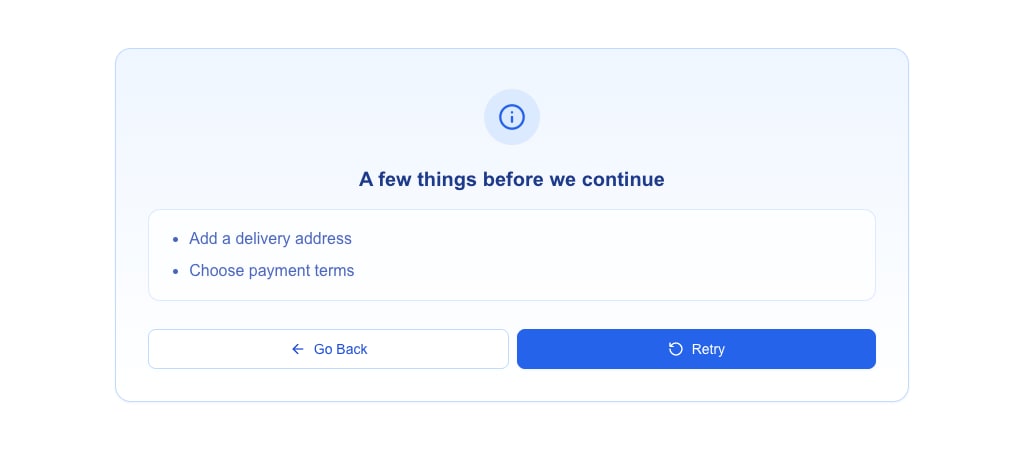
message can also be an array of strings. The message view then shows the items as a bullet list, even when the array has one item:
json
{
  "oneclick_data": {
    "error_message": {
      "title": "A few things before we continue",
      "message": ["Add a delivery address", "Choose payment terms"],
      "variant": "info"
    }
  }
}
| Field | Type | Default | Notes |
|---|---|---|---|
title | string | — | Required. |
message | string or string[] | — | Required. An array must have at least one item, and no item can be empty. An array is accepted only inside the object form, not as the whole error_message. |
variant | destructive, warning, info, success or default | destructive | Sets the colours and the icon of the message view, the same five variants as an Alert. The look only: the response is still an error, so the buttons, the Request action and the form behave the same for every variant. |
hideRetry | boolean | false | Hides Retry. |
hideBack | boolean | false | Hides Go Back. |
message_view
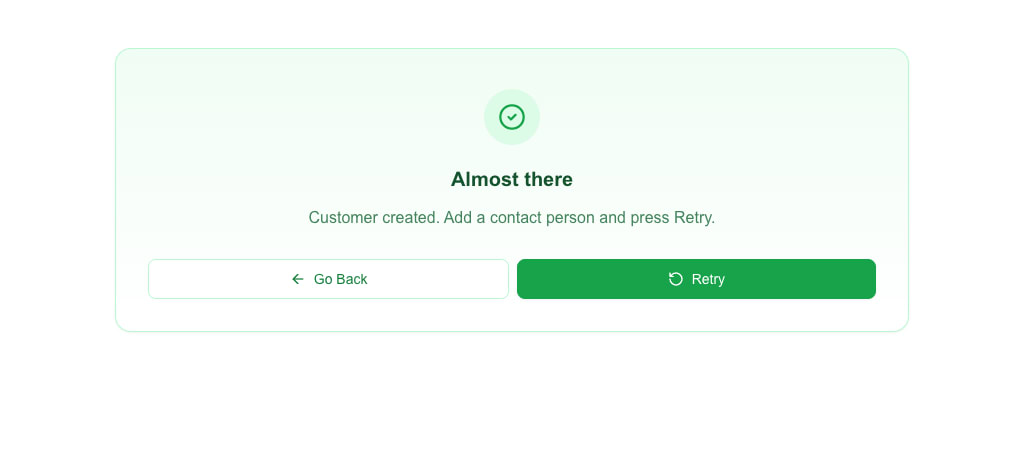
message_view is another name for the object form of error_message. Use it when the message view is not an error, such as a success or info note. It takes the same fields and shows the same message view:
json
{
  "oneclick_data": {
    "message_view": {
      "title": "Almost there",
      "message": "Customer created. Add a contact person and press Retry.",
      "variant": "success"
    }
  }
}
- It accepts the object form only. A plain string is invalid.
- A missing
variantisdestructive, as witherror_message. - The response still counts as not a success, whatever the variant: the buttons, the Request action,
refresh_after_successand the form behave as they do forerror_message. message_viewbesidemessageorredirect_viewshows the message view; the toast and the redirect do not happen, as witherror_message.- When a response carries both,
error_messagewins andmessage_viewis ignored. An invaliderror_messagemakes the whole payload invalid, even beside a validmessage_view.
The icon is fixed per variant and the sender cannot choose it. A payload that breaks these rules, such as an empty array or an unknown variant, is invalid oneclick_data and is ignored like any other invalid payload.
The same message view also appears when a form submission on this view returns oneclick_data.error_message or oneclick_data.message_view — the message view takes over the render. Plain-string error_message values are shown with a default title of "Error" and the destructive variant.
Redirect response
json
{
  "oneclick_data": {
    "redirect_view": {
      "id": "target-view-id",
      "params": { "deal_id": "123" }
    }
  }
}
The view replaces its content with a centred loading spinner and the text "Redirecting…", then navigates to the target view after a short delay. The text is rendered in-page, not as a toast.
Timeouts and failures
- Timeout — if no response arrives within roughly 20 seconds, the user sees "Request timed out. No custom data received."
- Non-2xx HTTP status — the user sees "Data loading failed (status 500)" (or whichever status came back).
Those two messages are built-in — the server cannot customise them. To show a message you control, return the error-response shape above.
See also
- Form Submission Types — how the request is built.
- Messages & Toasts — which HTML tags you can use in
messageandtitle.