Appearance
Are you an LLM? You can read better optimized documentation at /how-to/data/messages-and-toasts.md for this page in Markdown format
Sending Messages and Toasts from Your Backend
Type: How-to | Audience: Interface builder user | Goal: Decide exactly what your API should return so the user sees the right message in the right place
Interface Builder shows user-visible messages in three places:
- Toast — a short notification that pops up in a corner of the view.
- Inline alert — a coloured box that replaces the form after submission.
- Full-page message view — takes over the view and offers Retry / Go Back buttons.
You decide which one appears by combining the button's settings with the shape of the response your API returns.
Do I need oneclick_data?
No — not for a plain toast. A toast can come from several simpler shapes; the oneclick_data envelope is only required when you want:
- a redirect (navigate the user to another view) on a URL button or a form submit, or
- a full-page message view (on a view data source or on a form submission error).
For a plain toast — success or error — a top-level response with a message is enough. For URL buttons, even a plain text body (not JSON) works.
Two-minute recipes
Pick the row that matches your situation.
| I want… | Button setup | Return from API |
|---|---|---|
| A success toast after form submit | Form Submit, After submission = Wait for response | { "message": "Saved." } |
| A coloured toast with a title | same | { "message": "Profile is up to date.", "title": "Saved", "variant": "success" } |
| Replace the form with a "thank you" screen | same + Show message after submission ON | same shape as above |
| Navigate to another view after submit | Form Submit, After submission = Wait for response | { "view_id": "receipt-view" } |
| Show a toast, then navigate | same | { "oneclick_data": { "message": "Done.", "redirect_view": { "id": "receipt-view" } } } |
| Error toast on failed submit | same + non-2xx HTTP status | { "message": "Email already in use." } |
| Full-page error after failed submit (view with a data source) | same + non-2xx HTTP status | { "oneclick_data": { "error_message": { "title": "Blocked", "message": "…" } } } |
| Quick toast after URL button click | URL Button | plain string body: "Added to cart" — or { "message": "Added to cart" } |
| Redirect after URL button click | URL Button | { "oneclick_data": { "redirect_view": { "id": "next" } } } |
| Toast then redirect after URL button click | URL Button + Wait page transition ON | Stream interim toasts via the polling endpoint, then return { "oneclick_data": { "redirect_view": { "id": "next" } } }. URL buttons drop a sibling message next to redirect_view. |
| Full-page error on view data source | View with a data source | { "oneclick_data": { "error_message": { "title": "…", "message": "…" } } } |
The rest of the page explains each case in detail.
Form submit responses
For form submits the submit button's After submission setting decides what the builder does with your response.
After submission = Wait for response
All the shapes below are accepted. Return the simplest one that fits.
Just a toast — return a JSON body:
json
{ "message": "Profile saved" }Coloured toast — add a variant:
json
{ "message": "Profile saved", "variant": "success" }variant can be default, destructive, info, success, or warning.
Toast with a title — add a title:
json
{ "message": "Profile is up to date.", "title": "Saved", "variant": "success" }- With Show message after submission off → shown as a toast where
titleis the bold first line andmessageis the description. - With Show message after submission on → the form is replaced by an inline alert containing the title and message. The view scrolls to it automatically.
Just a navigation — no message, just send the user to another view:
json
{ "view_id": "target-view" }Toast plus navigation — return the oneclick_data envelope. This is the only shape that carries both:
json
{
  "oneclick_data": {
    "message": "Saved.",
    "redirect_view": { "id": "receipt", "params": { "order_id": "4321" } }
  }
}
After submission = Select view
The button navigates on its own once the server replies. You usually need no body at all — HTTP 2xx is enough. If you want a toast to flash just before the navigation, return one of these:
json
{ "message": "Saved." }json
{ "success": "Saved." }json
{ "oneclick_data": { "message": "Saved." } }All three produce a success toast and then the navigation.
Submit errors
Return any non-2xx HTTP status. The accepted bodies are:
| Body | What the user sees |
|---|---|
{ "message": "…" } | Error toast with the message |
{ "oneclick_data": { "message": "…" } } | Error toast with the message, plus a trailing "Something went wrong" toast (the body has no top-level message, so the unconditional fallback toast also fires) |
{ "oneclick_data": { "message": "…", "redirect_view": {…} } } | Error toast, then navigation |
{ "oneclick_data": { "error_message": "…" } } | Full-page message view replaces the view, plus a trailing "Something went wrong" toast in the corner |
{ "oneclick_data": { "error_message": { "title": "…", "message": "…", "hideRetry": false, "hideBack": false } } } | Full-page message view with your title and message, plus a trailing "Something went wrong" toast in the corner |
| Anything else | Generic "Something went wrong" toast |
The submit button re-enables on error unless you turned on Disable form after submission.
URL button responses
URL buttons accept any of these. Two of the shapes only render their toast when Wait page transition is enabled on the button — see URL button quirks below.
A plain text body (not JSON) — shortest path:
"Added to cart"Shown as a success toast. You may include inline HTML inside the string (see HTML support).
JSON with a top-level message — still no envelope needed:
json
{ "message": "Added to cart" }Also shown as a success toast.
Envelope with a message:
json
{ "oneclick_data": { "message": "Added to cart" } }Renders a success toast only when Wait page transition is on. If the button does not use Wait page transition (the default), this body is silently dropped — the user sees no toast. Prefer the top-level { "message": "…" } shape for plain toasts and reach for the envelope only when you also need a redirect or are already streaming interim updates through the polling endpoint.
Envelope with a redirect — the envelope is required for this:
json
{
  "oneclick_data": {
    "redirect_view": { "id": "receipt-view", "params": { "order_id": "4321" } }
  }
}
Silent navigation.
Envelope with both — only the redirect runs:
json
{
  "oneclick_data": {
    "message": "Payment successful",
    "redirect_view": { "id": "receipt-view" }
  }
}
URL buttons navigate as soon as a redirect_view is present and silently drop the sibling message. To show a message and then navigate, enable Wait page transition on the button and stream the toast through the polling endpoint before returning the final response with redirect_view. (Form submits behave differently — they show both the toast and then navigate; see Form submit responses.)
Errors: any non-2xx status becomes an error toast. The message comes from the body if it is a plain string or a { "message": "…" } object; otherwise the generic failure message is shown. The button re-enables so the user can try again.
URL button quirks
URL buttons handle the response in two stages: an immediate handler for the very first response, plus an optional polling loop that runs only when Wait page transition is on. Because of that split, the envelope { "oneclick_data": { "message": "…" } } only surfaces in the polling-aware path:
- Wait page transition off (the default): only the immediate handler runs. Plain string bodies and top-level
{ "message": "…" }produce a toast; envelope-onlyoneclick_data.messageis silently dropped. - Wait page transition on: the button polls for interim updates (each one becomes a
toast.info) and at the end shows the final response'soneclick_data.messageas atoast.success. If your final (immediate) response carries both amessageand aredirect_view, the message is dropped — only the redirect runs. Polled responses can carry both, in which case the polled message still shows astoast.infojust before the redirect.
URL buttons never render title or variant — the toast is always a success toast (or, on errors, an error toast). Those fields only take effect on form submits.
View data source error
When a view has a data source URL, the response fills the Data Picker's Custom tab. If you need to show an error instead of data — for example "Account not found" — return this shape (and the envelope is required):
json
{
  "oneclick_data": {
    "error_message": {
      "title": "Account not found",
      "message": "We could not find that account. <a href=\"/accounts\">Choose another</a>."
    }
  }
}
The view shows a full-page message view with your title and message plus Retry and Go Back buttons. Add "hideRetry": true or "hideBack": true to hide either button.
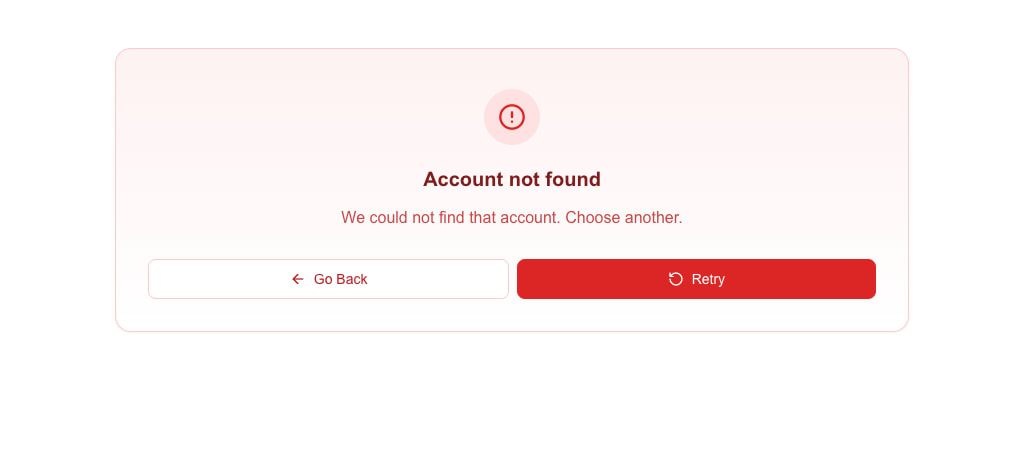
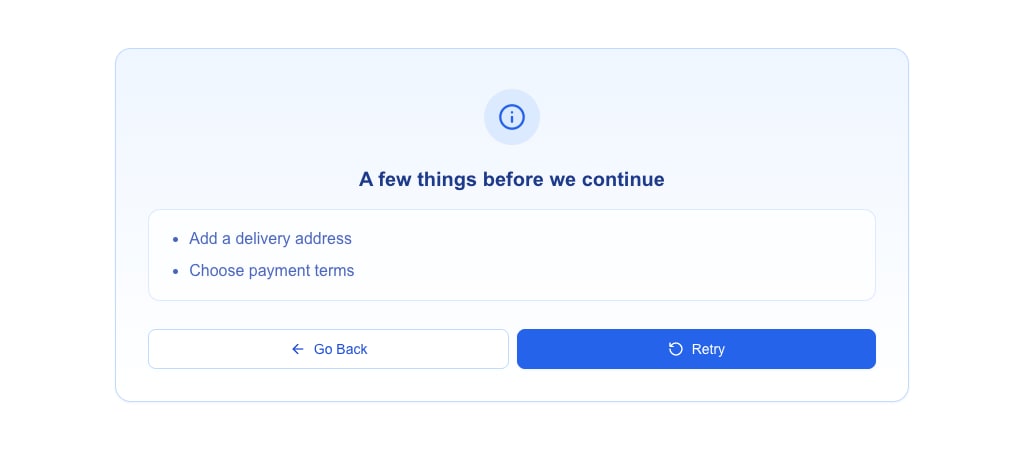
To list several things the user must fix, send message as an array of strings. The message view shows them as a bullet list. Add variant to change the colours and icon of the message view — destructive (default), warning, info, success or default:
json
{
  "oneclick_data": {
    "error_message": {
      "title": "A few things before we continue",
      "message": ["Add a delivery address", "Choose payment terms"],
      "variant": "info"
    }
  }
}
variant changes the look only. The buttons stay Go Back and Retry, and the response still counts as an error.
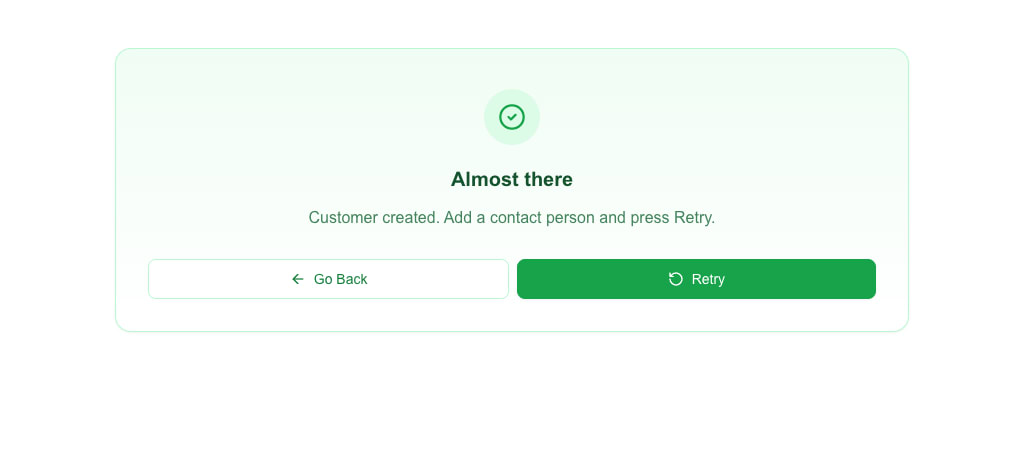
When the message view is not an error, send it as message_view instead of error_message. The fields and the view are the same; the name just reads better for a success or info note. message_view takes the object form only:
json
{
  "oneclick_data": {
    "message_view": {
      "title": "Almost there",
      "message": "Customer created. Add a contact person and press Retry.",
      "variant": "success"
    }
  }
}
If you only need a single-line message, the string form also works:
json
{ "oneclick_data": { "error_message": "Something went wrong" } }The same message view also appears when a form submit on this view returns oneclick_data.error_message or oneclick_data.message_view.
title and variant belong at the top level
Common mistake
The oneclick_data envelope does not carry title or variant — its allowed fields are only message, redirect_view, error_message, message_view, and event_id. Putting title or variant inside oneclick_data is silently ignored. (The variant inside the error_message or message_view object is a different field: it sets the look of the full-page message view.)
If you write:
json
{ "oneclick_data": { "message": "Done", "title": "Saved", "variant": "success" } }the title and variant are silently ignored.
Put them at the top level instead:
json
{ "message": "Done", "title": "Saved", "variant": "success" }URL-button toasts ignore title and variant
This top-level shape is only read on form submits with Wait for response. URL buttons do not support titles or variants — the toast always renders as a success toast regardless.
HTML support
Every message and title — whether at the top level or inside oneclick_data — passes through a narrow HTML allowlist before rendering. You can use a small subset:
<b> / <strong>   bold
<i> / <em>       italic
<u>              underline
<br>             line break
<code>           inline monospace
<a href="…">     link (opens in a new tab)
<p>              paragraph
<div>            generic wrapper
<ul> / <ol> / <li>   lists
Anything else is stripped. Links are sanitised: only https:, http:, mailto:, and tel: URLs survive; javascript: and other schemes are removed. A link left with no URL, an empty one, or a bare # shows as plain text. Event-handler attributes (onclick, onerror, …) are stripped from every tag.
Full rules are in the Messages & Toasts reference.
Picking a variant
Set variant to match the nature of the message. Variants only take effect in form-submit responses — URL buttons and oneclick_data.message always render as success toasts.
| Variant | Use when |
|---|---|
success | Operation completed normally |
info | Neutral informational message |
warning | Non-fatal problem the user should know about |
destructive | Error the user needs to fix |
default | Same as success — use when the colour does not matter |
Quick reference
| Situation | Minimal response | Optional/fancier response |
|---|---|---|
| Form submit (Wait for response), plain toast | { "message": "…" } | { "message": "…", "variant": "…" } |
| Form submit (Wait for response), toast with title | { "message": "…", "title": "…" } | add "variant" |
| Form submit (Wait for response), replace form | same as above + Show message after submission on | |
| Form submit (Wait for response), navigate | { "view_id": "…" } | { "oneclick_data": { "redirect_view": {…} } } |
| Form submit (Wait for response), toast + navigate | { "oneclick_data": { "message": "…", "redirect_view": {…} } } | — |
| Form submit (Select view), toast before navigation | { "message": "…" } or { "success": "…" } | { "oneclick_data": { "message": "…" } } |
| Form submit error | non-2xx + { "message": "…" } | non-2xx + { "oneclick_data": { "error_message": {…} } } for a full-page message view |
| URL button, plain toast | "…" (plain string body) or { "message": "…" } | { "oneclick_data": { "message": "…" } } only with Wait page transition on |
| URL button, redirect only | { "oneclick_data": { "redirect_view": {…} } } | — |
| URL button, toast then redirect | Wait page transition on; stream toasts via the polling endpoint, then return { "oneclick_data": { "redirect_view": {…} } } | — (a sibling message next to redirect_view is dropped) |
| View data source error (full-page message view) | { "oneclick_data": { "error_message": "…" } } | { "oneclick_data": { "error_message": { "title": "…", "message": "…" } } } |
See also
- HTTP Response Format — every response shape the builder accepts.
- Messages & Toasts reference — exact HTML allowlist and link sanitisation rules.
- Configuring Form Submission — the submit button settings that pair with these responses.